Beckhoff EtherCAT Coupler Configuration: EK1122 Dual RJ45 Port Network Setup, Terminal Assignment, Distributed Clock Synchronization, Process Data Mapping for PLC System
Introduction
In the realm of industrial automation, real-time communication is paramount for ensuring precise control and synchronization of machinery and processes. The EtherCAT (Ethernet for Control Automation Technology) industrial ethernet protocol has emerged as a leading solution for achieving deterministic, high-speed communication in factory automation environments. As a highly efficient fieldbus system, EtherCAT enables real-time data exchange with minimal latency, making it ideal for applications ranging from packaging lines to complex motion control systems.
At the heart of an EtherCAT network is the EtherCAT Coupler, which serves as the interface between the EtherCAT master controller and the EtherCAT Terminals that connect to I/O devices and actuators. The Beckhoff EK1122 EtherCAT Coupler, with its dual RJ45 ports, is a versatile and widely used component in EtherCAT networks. This article delves into the essential aspects of configuring the EK1122 coupler, including network setup, terminal assignment, distributed clock synchronization, and process data mapping. These topics are crucial for automation engineers and control system integrators aiming to optimize their EtherCAT networks for PLC and motion control applications in factory automation, particularly in packaging and assembly line environments.
For more background on EtherCAT and its comparison with other industrial ethernet protocols, refer to our related article on Industrial Ethernet Protocol Comparison.
EK1122 Dual RJ45 Port Network Setup and Topology
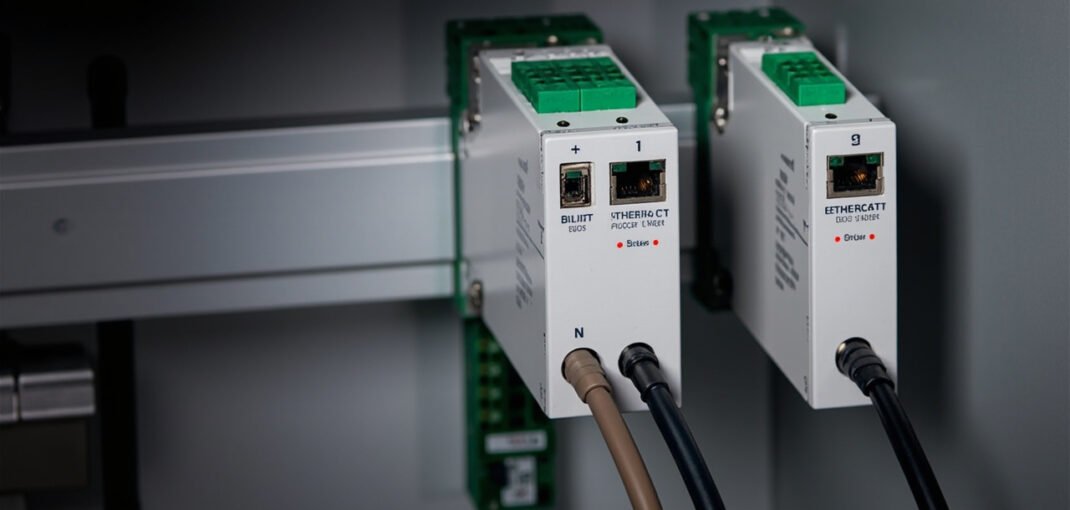
The Beckhoff EK1122 EtherCAT Coupler is equipped with two RJ45 ports, designated as IN and OUT, which facilitate the creation of EtherCAT networks in line or tree topologies. This dual-port design allows for the daisy-chaining of multiple couplers and terminals, providing flexibility in network design and expansion.
Network Topology and Cabling
- IN Port Connection: The IN port of the EK1122 is connected to the master controller or the upstream EtherCAT device. This connection serves as the entry point for EtherCAT frames into the network segment.
- OUT Port Connection: The OUT port is connected to the downstream EtherCAT Terminals or additional couplers. This configuration enables the daisy-chaining of multiple devices, allowing for the expansion of the network.
- EtherCAT Frame Processing: EtherCAT employs the “processing on-the-fly” principle, where the EtherCAT frame is processed by each terminal as it passes through, eliminating the need for individual addressing and reducing latency.
- Network Cabling: The recommended cable for EtherCAT networks is Cat5e shielded twisted pair (STP), which supports high-speed data transmission and provides noise immunity. The maximum segment length is 100 meters, ensuring reliable communication over substantial distances.
- LED Indicators: The EK1122 features LED indicators for link status, activity, and speed. These indicators provide real-time feedback on the network’s operational status, with a green LED indicating a 100 Mbps connection.
- IP Address Configuration: EtherCAT networks do not require individual IP address configuration for each device, as they utilize MAC address routing. This simplifies network management and reduces configuration overhead.
- Power Supply: The Beckhoff EK1122 requires a power supply module, such as the Beckhoff CX1100-0014 Power Supply Module, to provide power to the bus terminals. Alternatively, the Rexroth VAU01.1U-024-024-240-NN Power Supply can be used for specific applications.
- Network Commissioning: Commissioning of the EtherCAT network is facilitated by the TwinCAT software, which includes a device scan function to automatically detect and configure connected devices.
For detailed wiring instructions, refer to our related article on PLC Digital Input Module Wiring.
Terminal Assignment and Addressing Scheme
The Beckhoff EtherCAT Terminal product family encompasses a wide range of terminals, including digital input (DI), digital output (DO), analog input (AI), analog output (AO), and special function terminals. Each terminal type serves a specific purpose in the automation system.
Terminal Types and Examples
- Digital Input (DI): The Beckhoff EL1008 8-channel digital input terminal operates at 24V DC with a response time of 3ms. It is suitable for interfacing with various sensors and switches.
- Digital Output (DO): The Beckhoff EL2008 8-channel digital output terminal provides 24V DC outputs with a current rating of 0.5A. It is used for controlling actuators and other output devices.
- Analog Input (AI): The Beckhoff EL3068 8-channel analog input terminal supports both 4-20mA and 0-10V signals with a 16-bit resolution. It is ideal for interfacing with analog sensors and transducers.
Addressing and Configuration
- Automatic Addressing: Terminals are automatically addressed based on their position in the EtherCAT chain. The EK1122 coupler reads the terminal configuration from the EEPROM at power-up, ensuring seamless integration.
- TwinCAT I/O Configuration: The TwinCAT software provides a user-friendly interface for terminal detection and naming. This facilitates the organization and management of terminals within the automation system.
- Auto-Config Function: The auto-config function allows for the replacement of terminals without the need for manual reconfiguration. This feature enhances the maintainability and flexibility of the system.
Distributed Clock Synchronization for Motion Control
Distributed clock (DC) synchronization is a critical feature for applications requiring precise synchronization of multiple axes, such as in motion control systems. The EK1122 coupler supports distributed clock functionality with a jitter of less than 1 microsecond, ensuring high accuracy in synchronization.
Synchronization Features
- Jitter Performance: The EK1122 achieves a synchronization accuracy of less than 1 microsecond, which is essential for high-speed motion control applications.
- Delay Compensation: The coupler includes compensation for signal propagation delays, particularly important for networks with long cable runs.
- TwinCAT Motion Control Configuration: The TwinCAT software allows for the configuration of axis coupling, electronic gear, and electronic cam functions, enabling complex motion control scenarios.
- Additional DC Functionality: The Beckhoff EL6751 EtherCAT Terminal can be used to extend the distributed clock functionality, providing additional synchronization capabilities.
- Synchronization Cycle Time: The synchronization cycle time can be configured for 1ms, 500us, or 250us, depending on the application’s requirements for high-speed motion.
- Reference Clock Selection: The reference clock can be selected as the master controller or the first coupler in the network, ensuring consistent synchronization across the system.
Process Data Mapping PDO and SDO Configuration
Process Data Object (PDO) mapping is essential for real-time I/O data exchange in EtherCAT networks. The EK1122 coupler comes with predefined PDO assignments for input and output data, which can be customized as needed.
PDO and SDO Features
- Default PDO Assignment: The EK1122 has default PDO assignments for input and output data sizes, which can be adjusted based on the specific requirements of the application.
- Service Data Object (SDO): SDOs are used for parameter access, configuration, and diagnostics. They provide a means for detailed configuration and monitoring of the EtherCAT network.
- TwinCAT Process Image Configuration: The TwinCAT software allows for the mapping of PDOs to PLC variables, facilitating the integration of EtherCAT I/O data into the PLC program.
- PDO Mapping Examples:
- Beckhoff EL3068 Analog Input: The PDO for the EL3068 is 2 bytes per channel, representing a 16-bit value.
- Beckhoff EL2008 Digital Output: The PDO for the EL2008 is 1 byte for 8 channels, with a bit-mapped configuration.
- SDO Configuration: SDOs can be configured for analog input scaling, filter settings, and diagnostic enablement, providing fine-grained control over the I/O parameters.
Comparison Table: EtherCAT Coupler Features
| Feature | Beckhoff EK1122 EtherCAT Coupler | Beckhoff CX1100-0014 Power Supply Module | Rexroth VAU01.1U-024-024-240-NN Power Supply |
|---|---|---|---|
| Port Count | 2 RJ45 ports | N/A | N/A |
| Power Supply | Requires external power supply | 24V DC input | 24V DC input |
| Functionality | EtherCAT network interface | Power distribution for bus terminals | Power distribution for bus terminals |
| Terminal Support | Supports all Beckhoff EtherCAT terminals | N/A | N/A |
| Application | Ideal for complex motion control and high-speed applications | General-purpose power supply for EtherCAT networks | General-purpose power supply for EtherCAT networks |
FAQ
1. Can the EK1122 coupler be used in a ring topology?
Yes, the EK1122 coupler can be used in a ring topology by connecting the OUT port back to the IN port of the master controller or another coupler. However, this requires careful configuration to ensure proper communication and fault tolerance.
2. How does the EK1122 handle network failures?
The EK1122 coupler includes error detection and fault handling mechanisms. In case of a network failure, the coupler can isolate the faulty segment and continue operation of the remaining network. This ensures high reliability and uptime for the automation system.
3. What is the maximum number of terminals that can be connected to the EK1122?
The maximum number of terminals that can be connected to the EK1122 depends on the data size and the cycle time of the application. Generally, the EK1122 can handle up to 65,535 terminals, but practical limitations such as data bandwidth and processing power may reduce this number.
Conclusion
Configuring the Beckhoff EK1122 EtherCAT Coupler involves several key steps, including network setup, terminal assignment, distributed clock synchronization, and process data mapping. By following the guidelines outlined in this article, automation engineers and control system integrators can optimize their EtherCAT networks for high-performance, real-time applications in factory automation.
For further reading on EtherCAT and related topics, refer to our Industrial Ethernet Protocol Comparison article and the PLC Digital Input Module Wiring guide.
Ready to implement an EtherCAT network? Check out the Beckhoff EK1122 EtherCAT Coupler and the Beckhoff CX1100-0014 Power Supply Module for your automation projects.